
Privacy & what leaves your Mac
Detection and judgment happen entirely on-device. Nothing identifiable leaves your Mac by default, discovery lookups are anonymous, and the client is open source so you can read exactly what is sent.
On-device by default
Almost everything Anomalous learns about your Mac never leaves your Mac. Watching processes, learning each one's normal baseline, and judging whether something is genuinely wrong all run locally. Your acknowledgments, your learned baselines, and the running journal of what happened stay on the machine. No account is required to run the sensor. Contribution requires an explicit choice.
When you ask "what leaves my Mac?", the honest answer is: local analysis stays on your Mac. Data goes on the wire through three narrow, named flows described below. Contribution requires consent, discovery requires confirmation, and the third, paid triage, is account-linked and only happens when you ask for help.
Under the hood
The Transparency panel states this verbatim: all detection, baselines, and judgment run on the
Mac, and acknowledgments, baselines, and the journal never leave it
(SettingsView.swift:344). This is the same posture documented in the sensor's
SECURITY.md and NETWORK.md.
Anonymous vs account-linked
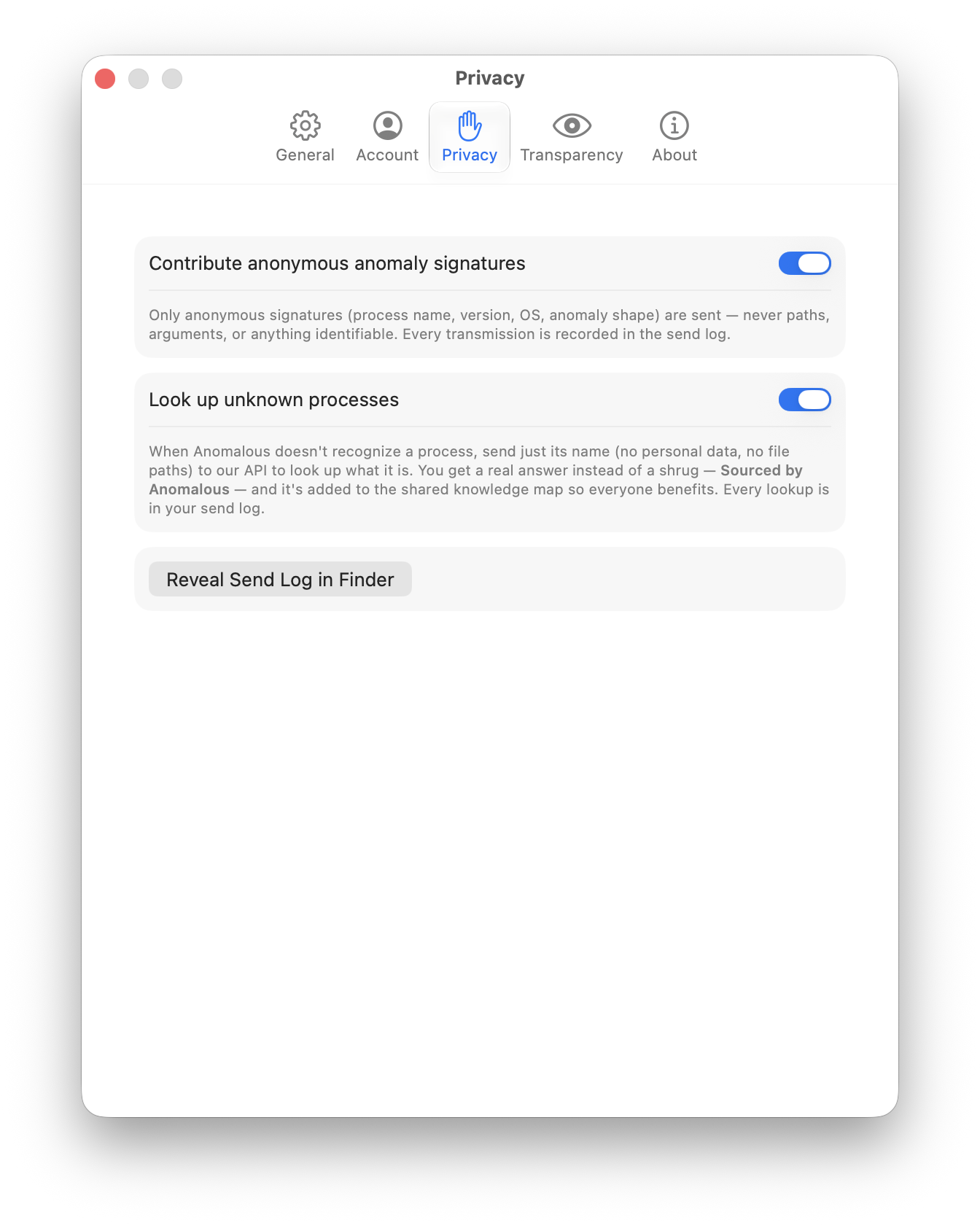
Anomalous keeps two kinds of transmission rigorously separate, and never conflates them. Anonymous telemetry carries no link to who you are. Account-linked triage is the single paid flow that is deliberately tied to your identity, and only for billing and returning your results. Knowing which is which is the whole trust model, so here is the exact split.
- Anonymous anomaly signatures (free, explicit consent required — toggle off anytime). A compact description of a misbehavior is contributed to the shared knowledge corpus: process and executable name, bundle id, app version, install-source category, the anomaly's type and shape, a coarse OS version and hardware class, and an hour-truncated timestamp. Never file paths, arguments, usernames, hostnames, or command lines.
- Anonymous discovery lookups (free, on by default — with a one-time confirmation before the first lookup). Covered in its own section below.
-
Account-linked triage (paid, "Get Help"). When you explicitly ask for an expert
diagnosis, an allowlisted payload — bundle id, versions, anomaly type, install source, a prose
summary, and CPU/memory metric curves with baselines — is sent with your account token to
/api/v1/triage. This one is linked to your account so it can be billed and answered. See Accounts, tokens & Get Help and the AI tiers.
The important detail: anonymity here is structural, not a promise to scrub data later. These payloads omit account identifiers, paths, arguments, usernames, and hostnames. Network infrastructure can still observe your IP address. Command lines are excluded everywhere on purpose, because they routinely carry credentials.
Under the hood
AnomalySignaturePayload has no fields for user, path, hostname, or command line, to
limit the information sent
(SignatureComposer.swift:3-6). The observed_at timestamp is truncated
to the hour to resist timing correlation (SignatureComposer.swift:70-73), and individual signature records are not published in the public sample.
The paid triage summary is assembled only from already-safe fields — there is no code path by
which a full path, argument, username, or command line could reach it
(PayloadComposer.swift:2-7, 53-63). The account bearer token can never traverse
cleartext HTTP to a remote host: anything but localhost must be HTTPS, or the request throws
insecureTransport (EscalationClient.swift:37-43). On the server the
route table encodes the same wall — anonymous endpoints require no auth and have no user columns
downstream, while triage sits behind Sanctum authentication
(routes/api.php:16-56).
The transparency panel
Anomalous shows you where your data goes rather than asking you to trust it. The Transparency tab in Settings lists every dimension the sensor samples — CPU, memory, GPU, power and wakeups, disk, network volume, Neural Engine, responsiveness, process identity, machine context — each with a plain-English reason (the full inventory is on what we measure, and why). A "Where your data goes" section names the server and repeats that detection, baselines, and the journal stay on your Mac.
It also does something most tools don't: a "Held back this check" section shows the low- and medium-confidence things the sensor observed but chose not to bother you with. You see not just what was flagged, but what was deliberately watched and withheld — those surface only if confidence rises or an acknowledged envelope is exceeded.
Under the hood
The panel's on-device statement and "Where your data goes" row live at
SettingsView.swift:344; the quiet-findings list at
SettingsView.swift:311-330. A "Reveal Send Log in Finder" button opens a folder
holding a byte-for-byte record of every transmission — signature, discovery, or triage — written
before it goes on the wire (SendLog.swift:3-23). You can diff that local
ledger against fields retained by the server. Server JSON storage does not preserve original whitespace or key order. A divergence between
what is sent and what is logged is treated as an in-scope security vulnerability.
Discovery lookups are anonymous
When Anomalous doesn't recognize a process, it can look up what it is — and that lookup is anonymous and free, never tied to your account. It's on by default, but the first automatic lookup pauses to ask you to confirm; after that it sends just the process name (plus bundle id, versions, install source, and anomaly type) to research the process and return a "Sourced by Anomalous" answer. Shared corpus publication requires human review. No file paths, no user, no arguments. This is a different flow from paid triage: what we inspect, and why and the discovery engine walk through the full loop.
Under the hood
DiscoveryClient.Request has no field for paths, user, or arguments, which limits the information sent (DiscoveryClient.swift:8-14, 33-51), and each request
is recorded byte-for-byte to the send log under flow .discovery before it is sent
(DiscoveryClient.swift:195-197). The discovery route is anonymous and never
account-gated, throttled to 20 requests per minute keyed by IP
(routes/api.php:34-56). When the backend later re-fetches a cited source URL to
verify it, an SSRF guard screens every hop: http(s) only, and the host must resolve exclusively
to public IPs — loopback, RFC1918 private, link-local, the 169.254.169.254 cloud
metadata endpoint, and their IPv6 equivalents are all rejected
(SourceFetcher.php:74-108).
The anonymous endpoints are gated by Apple's App Attest: the app registers a
key in your Mac's Secure Enclave and signs every discovery and ingest request, and the server
verifies that signature before it accepts anything (AppAttestService.swift). This
confirms the request comes from a genuine, untampered copy of Anomalous — not who you are: it
adds abuse protection without adding identity, and it does not change what is sent, since the
payload shapes above are already anonymous. (An unsigned local build running against a dev
server sends a clearly-marked placeholder instead, which production refuses.)
Read the code yourself
You don't have to take any of this on faith. The sensor client is open source under Apache-2.0, so the payload types, the send log, and the exact fields that go on the wire are all readable. If the code and this page ever disagree, the code wins — and de-anonymizing telemetry or linking an anonymous signature to an account is explicitly an in-scope security vulnerability.
-
The sensor —
github.com/msitarzewski/anomalous-mac.
Read
SignatureComposer.swift,DiscoveryClient.swift,PayloadComposer.swift, andSendLog.swiftto see for yourself that the payloads omit account identifiers, paths, arguments, usernames, and hostnames. - The public corpus — github.com/msitarzewski/anomalous-corpus, the process-identity data set that grounds every card. It may still be private as it opens up, but pull requests and corrections are welcome. See the public corpus for how to contribute.
Transparency is the product here: nearly everything stays on your Mac, the rest is anonymous by construction or account-linked only for paid help you asked for, and diagnostic request bodies are logged locally.