
Accounts, tokens & Get Help
Create an account to use paid cloud triage. Fund a prepaid balance, connect the app with a per-machine token, and spend credits only when you ask for help.
When you need an account
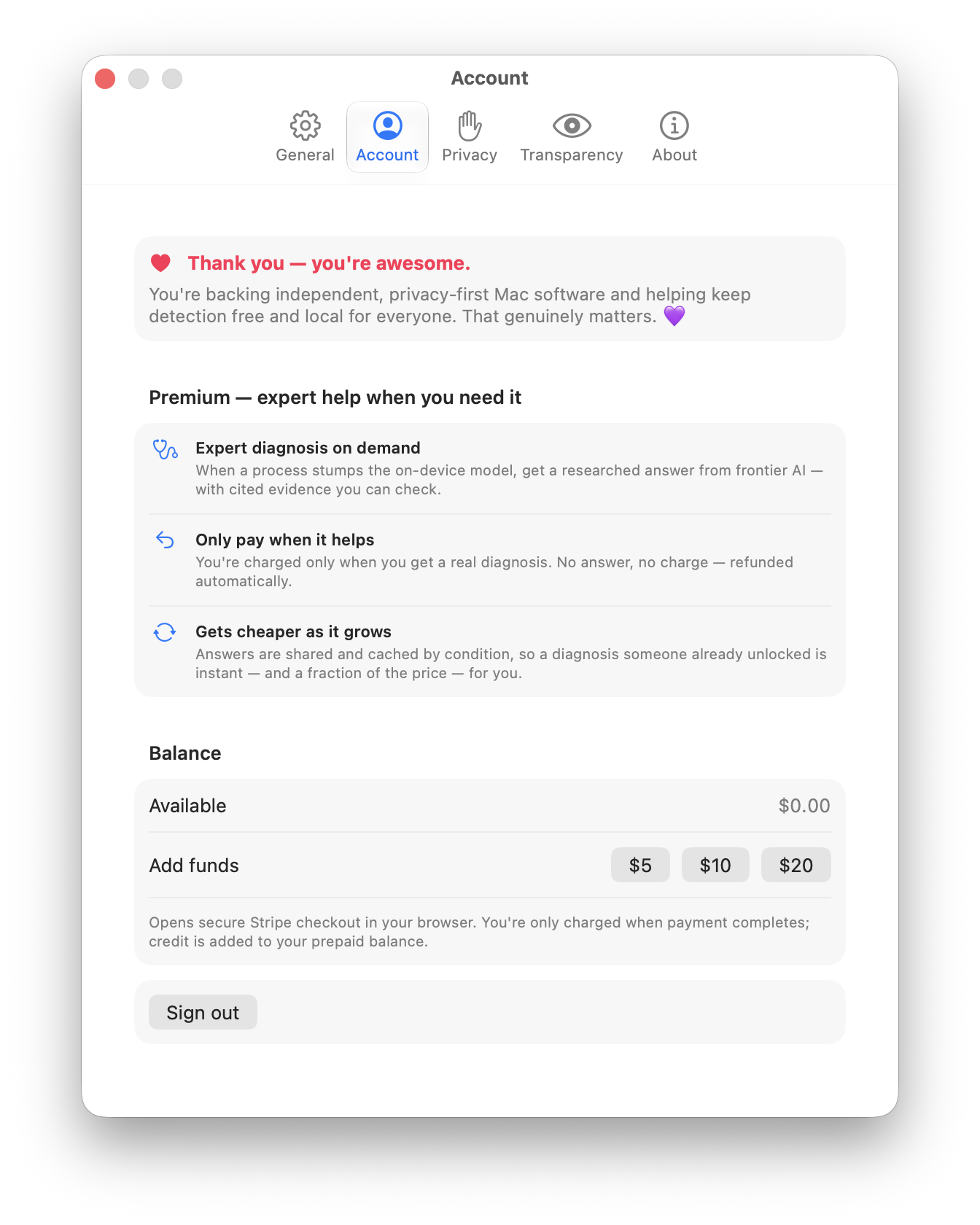
You do not need an account to use Anomalous. Installing the app, watching your Mac locally, and seeing anomalies surface are all free and require no sign up. An account exists for one reason: the paid cloud layer. When you press Get Help on an anomaly, the app can send that case to a smarter model in the cloud for a diagnosis, and that costs a few cents. To spend those cents you need an account with a prepaid balance.
Everything else stays on your Mac. If you never use Get Help, you never need an account, a token, or a balance. See AI tiers for how the free local layer and the paid cloud layer differ, and Privacy for what leaves your machine when you do escalate.
Creating an account
Registration is invite-gated during launch. You need a valid invite code, which an admin mints from the dashboard. Codes are short, human-readable strings from an unambiguous alphabet, like K7PXQ-9MRT4, and each one can carry a use cap and an expiry.
There are two ways to sign up:
- From the Mac app. The app registers natively over the API using your email and an invite code, and receives an account token straight back. There is no password and no email confirmation step on this path. The single-use invite is the gate, and your email is captured only for receipts and balance recovery.
- From the web dashboard. The web path sets a password and verifies your email. A 6-digit one-time code is emailed to you; you enter it, and only a verified account can reach the dashboard.
Under the hood
The app path is POST /v1/account/register (email plus invite code) and returns a Sanctum bearer token immediately (AccountRegistrationController.php:16-28,76-81). Invite codes are consumed atomically: the code row is locked and its uses counter incremented inside the same transaction that creates your user, so a one-use code can never be redeemed twice even under a race (AccountRegistrationController.php:44-74). Invite gating is controlled by require_invite, which defaults true and can be turned off with ANOMALOUS_REQUIRE_INVITE=false (config/anomalous.php:26). Codes draw from an alphabet with no 0/O or 1/I and support optional max_uses and expiry (InviteCode.php:28-63).
On the web path, the OTP is never stored in clear: only its SHA-256 hash is cached, for 10 minutes, with a 5-attempt cap, and verifying or expiring it clears the hash (EmailOtp.php:18-65). The /dashboard route sits behind auth plus verified middleware, and verification happens at POST /email/verify-otp (routes/web.php:33-40).
Connecting the app with a token
An account token is how the Mac app proves it is you. You can get one two ways: the Mac app can register natively under Settings → Account and receive a token straight into its Keychain, or you create one in the web dashboard and paste it into the app once. Either way the app stores it in your Keychain and uses it to authenticate every request. One token per machine keeps things tidy: if a Mac is lost or retired, you revoke just that token.
The dashboard lists each token by name with its last-used time, and lets you revoke any of them. It shows last seen rather than a live "active" light, because without an app heartbeat an active indicator would only mean "used recently" and would mislead.
Under the hood
Tokens are Laravel Sanctum bearer tokens minted at DashboardController::createToken (DashboardController.php:104). Sanctum normally keeps only a hash of a token, so the plaintext is shown once and lost. Here the plaintext is additionally stored in an encrypted column (Laravel Crypt) so it stays copyable from the dashboard later; Sanctum still authenticates against its own hash, and the encrypted copy is purely for display (DashboardController.php:104-123). Legacy or undecryptable rows simply show as non-copyable. Listing and revocation live at DashboardController.php:132-161.
Funding a balance
Your balance is prepaid. You top it up in advance, then Get Help draws it down a few cents at a time. You can add between $5 and $200 per top-up, and you can start one from either place — the web dashboard or the app's Settings → Account tab (Add Funds) — both open the same Stripe-hosted checkout in your browser. No card data ever touches the Anomalous server; checkout is handled entirely by Stripe.
One thing to expect: starting a checkout does not add credit. Your balance updates only after Stripe confirms the payment back to the server, which is normally a second or two after you finish paying. If a top-up has not appeared yet, that confirmation is still in flight; it is not lost.
Under the hood
Balance is never a mutable number. It is always computed as the sum of signed cent-deltas in the triage_credits table (Balance.php:15-18), an append-only ledger whose reasons are topup, triage_charge, refund, cache_discount, and adjustment. Top-ups are constrained to 500-20000 cents (DashboardController.php:82). A checkout could be abandoned, back-buttoned, or spoofed, so the redirect credits nothing; user id and amount ride in Checkout metadata for later (StripeTopup.php:9-18).
The only place money moves is the Stripe webhook. Stripe posts checkout.session.completed to POST /v1/stripe/webhook; the server verifies the signature against STRIPE_WEBHOOK_SECRET and credits the ledger exactly once, keyed on the Checkout session id, so a redelivered webhook is a harmless no-op (StripeWebhookController.php:29-80). That signature is the authentication; the route has no login and no CSRF (StripeWebhookController.php:20-24). Crediting prefers the amount Stripe actually collected over the amount in metadata (StripeTopup.php:85-93). Until STRIPE_WEBHOOK_SECRET and the Stripe secret key are configured, the webhook and top-up return 503 / "payments not configured."
What Get Help costs
Each Get Help escalation costs a flat 50 cents, charged the moment you submit. If your balance cannot cover it, the request is declined with an insufficient-balance error and nothing is spent. The charge is honest after the fact:
- Cached answer: 10 cents. If an identical case has already been diagnosed for your account, you are served that result and 40 cents of the 50 is refunded, so the case costs only 10 cents.
- No answer or a failure: fully refunded. If the service cannot produce a real diagnosis, or the background job fails, the entire 50-cent charge is returned. You pay for a diagnosis, never for the service being unable to give you one.
Under the hood
Submission is POST /v1/triage. The server takes a row lock on your user, checks you can afford 50 cents, writes the request, and debits the ledger all in one transaction, so N concurrent submissions cannot race the same balance into unbounded paid inference (TriageController.php:21-73). Insufficient funds returns HTTP 402. A background job then adjusts the charge: a cache hit refunds 40 cents (ProcessTriageJob.php:99-113); a no-diagnosis result or a queue failure refunds the full charge and records cost 0 (ProcessTriageJob.php:68-73,151-159). The live cloud diagnosis requires an Anthropic provider key; without one the job returns an honest empty card and refunds the charge rather than faking a result (ProcessTriageJob.php:161-167).
Managing tokens
All of your account tokens live on the web dashboard. Each shows its name and when it was last used, and any of them can be revoked. Revoking a token immediately cuts off the Mac that holds it; to reconnect, mint a new token and paste it into the app again. If a machine is lost, revoking its token is the fastest way to lock it out without disturbing your other Macs.
Your dashboard also shows the prepaid balance and a recent-activity ledger, so you can see each top-up, charge, refund, and cache discount as its own line rather than as a single edited number.
Under the hood
Token listing and revocation are at DashboardController.php:132-161. Triage show and delete deliberately return 404 rather than 403 for rows you do not own, so one user cannot probe whether another user's triage exists (TriageController.php:83-87, DashboardController.php:167-175). Every balance line is a signed row in triage_credits, which is why activity reads as an auditable ledger.
Getting help with your account
Anomalous is open source. If something about accounts, tokens, or billing is unclear or broken, issues and pull requests are welcome on the sensor repository at github.com/msitarzewski/anomalous-mac, and the public data corpus at github.com/msitarzewski/anomalous-corpus. The corpus repository may still be private today; PRs are welcome once it opens.